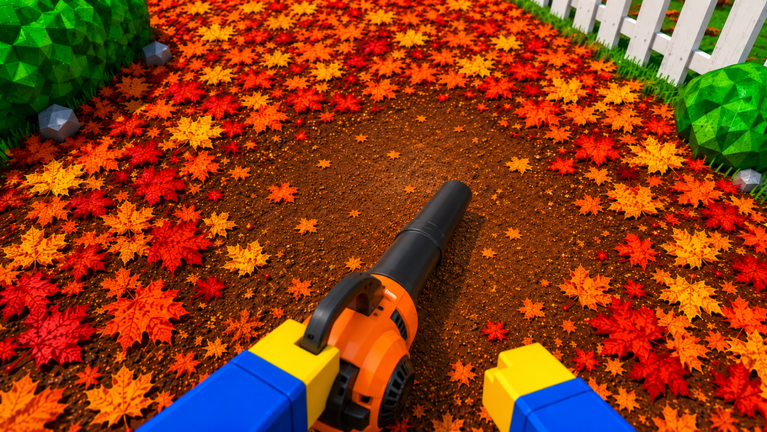
Garden Cleaner Evolution is a cozy incremental simulator on Roblox where you sweep leaves, sell them, upgrade tools, unlock new gardens, and eventually rebirth for permanent bonuses. Salient Experiences released the experience on 2026-07-17; it is still receiving updates through August 2026 (~3.2M+ visits) with secrets, quests, and new areas. This guide is your first-session checklist — not to be confused with Grow a Garden or the Steam title Leaf it Alone, which are entirely different games.
Install and join correctly
Open the official place page for Garden Cleaner Evolution and press Play. Servers support up to 8 players in online multiplayer, but your inventory and cash are personal. Pick any server with low ping; you do not need a private server to learn basics.
Allow the initial load screen to finish. ASMR-style games often stream garden assets slowly on first join — rushing can make menus appear missing until textures settle.
First five minutes: tutorial beats
You start in the Entrance area. Community guides document this sequence through Tutorial Complete:
- Collect 50 leaves — hold click to gather faster than tapping.
- Sell at the Sell Bin — dump the bag for cash and clear inventory.
- Clear Entrance 50/50 — emptying the zone grants the Shed Key.
- Open the Shed — unlock the upgrade station (Yield, Cooldown, Capacity).
- Buy first Shed upgrades — fix your bottleneck; see Upgrade Station.
- Open Quest + Settings — finish tutorial prompts; Settings is where Codes redeem.
Do not skip selling to hoard leaves — cash unlocks Shed tiers faster than a full bag sitting idle. After Tutorial Complete, redeem GiveMeRake / GiveMeLeafblower via the gear icon (How to Redeem).
First-session goals
Aim to complete these before logging off:
- Buy your first Shed upgrades — Capacity if trips are constant, Yield if sells are weak, Cooldown if pickups lag.
- Redeem active codes — temporary Rake / Leafblower for this rebirth.
- Preview the Rake Shop — cash Rake ~$1,500 once Shed stats feel stable (Rake Shop).
- Clear the starter garden once end-to-end — learn spawn patterns for leaf piles.
- Locate the shop, sell point, and settings menus — you will need them for Codes later.
- Glance at quests or titles if the UI exposes them — long-term goals live under Players.
- Note where area gates sit — even if you cannot afford entry yet, preview costs for Areas and Progression.
If a promo code appears on the Codes hub, redeem via How to Redeem Codes before spending boosted cash on the wrong upgrade.
Controls overview
Garden Cleaner Evolution uses standard Roblox movement (WASD on PC, thumbstick on mobile, tap-to-move optional). Sweeping is typically click/hold on PC or a dedicated Sweep button on mobile. Jump rarely matters except for small ledges between garden sections.
Camera drag helps on mobile when leaf piles cluster near fences. Lower graphics if frame drops cause missed clicks — incremental games punish input lag more than visual flair.
For a deeper input breakdown, watch the overview video embedded on this page or read How to Play for loop-focused advice rather than keybind tables alone.
Economy basics you must understand early
The game follows a simple incremental chain:
Sweep leaves → sell for cash → buy tool or area unlock → sweep faster → repeat.
Early cash should go to multiplicative upgrades (wider sweep, faster tick) before cosmetics. A cheap skin is fine if it motivates you, but power purchases shorten grind.
Compare shop prices against sell values. If the next garden pays double per leaf but costs ten times your bank, grind the current zone a bit longer — the Areas guide expands that math.
When to think about rebirth
Rebirth is a reset mechanic that trades short-term progress for permanent bonuses. You usually should not rebirth in your first session unless the game explicitly prompts you with a huge early bonus. Read Rebirth once your cash gains slow down in the mid-game.
Multiplayer etiquette
Shared servers are low stress, but courtesy keeps the ASMR vibe intact:
- Do not block sell NPCs or shop terminals.
- Avoid spamming sound emotes if others are relaxing.
- Share patch notes politely when Updates confirm changes.
You cannot grief another player’s leaves, so focus on your route efficiency.
Where to go next
| Topic | Page |
|---|---|
| Full gameplay loop | How to Play |
| Area unlock order | Areas and Progression |
| Reset timing | Rebirth |
| Hidden rewards | Secrets |
| Best tools | Tier List |
| Promo rewards | Codes |
First hour checklist (printable)
- Join official place, finish tutorial sweep and sell
- Buy first DPS upgrade (width or speed)
- Map shop, sell, and quest UI locations
- Save spare cash instead of buying cosmetic-only items
- Bookmark Guides and Updates for patch day
You are now past the steepest learning curve. The incremental hook kicks in once your rake clears whole patches per pass — keep upgrading and the gardens open faster than you expect.
Frequently Asked Questions
Quick answers for Garden Cleaner Evolution players.
What should I do first in Garden Cleaner Evolution?
Complete the tutorial sweep, sell leaves for cash, and buy your first tool upgrade that increases sweep width or speed. Locate shop and sell menus before exploring far.
Is Garden Cleaner Evolution free on Roblox?
Yes, you play through Roblox for free. Optional gamepasses or boosts may exist, but core sweeping and progression do not require a purchase to start.
How long should my first session last?
Thirty to sixty minutes is enough to learn controls, buy early upgrades, and see where the next garden gate is. You can progress further in the same session if boosts feel good.
Should I rebirth on day one?
Usually no. Rebirth shines after mid-game slowdown. Read the Rebirth guide once upgrades get expensive relative to your cash per minute.
Where do I find codes as a new player?
Check the Codes hub for verified active lists and the How to Redeem page for menu locations. No widely confirmed public codes existed as of late July 2026.
Can I play on mobile as a beginner?
Yes. Use the mobile sweep button if tap-hold feels awkward, and lower graphics if leaves stutter. Progress carries across devices on the same Roblox account.